


Lennar Account
3.928.00 Reviews
App Specs
- Version
- 256.020.1
- Updated On
- License
- Free
- Downloads
- 10,000+
- Developer
- Lennar Corporation
- Categories
- House & Home
- Platform
- Android
Screenshots
 Analysis by AppCompare
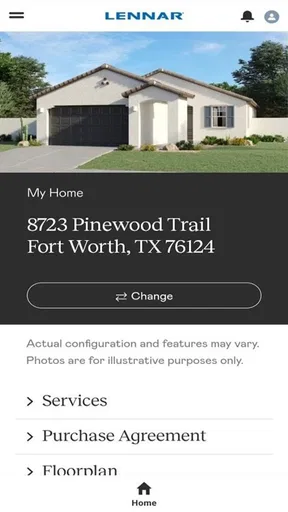
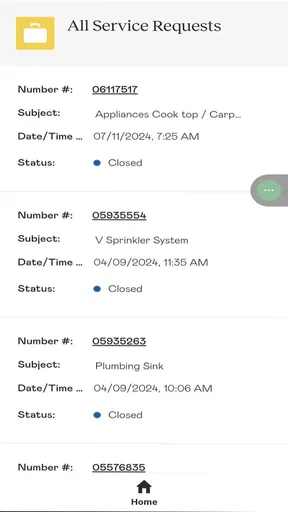
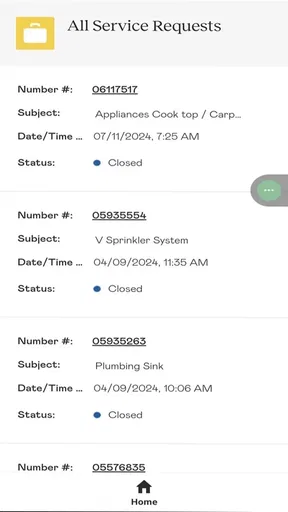
If you own a Lennar home and are trying to work out where to begin with a home-related claim, I’d start with Lennar Account. Its purpose is narrower than a general home-management app: it gives Lennar homeowners a place to submit claims and follow their progress. That focus is useful when you need to keep a repair issue from getting lost among texts, emails, and notes, but it also means the app is most relevant to a particular group of homeowners.
What to expect from a claims-focused app
I find it helps to think of this as a service channel rather than a digital household command center. The key task is handling a claim and checking its status, not running every part of homeownership from one screen. Lennar Corporation develops the app, which is free and listed in the House & Home category. It has a 4.2 average from around 150 ratings, and more than 10,000 installs. Those figures offer a little context, but they matter less than whether you own a Lennar home and need this particular workflow.
The app is rated for Everyone, and its current version is 256.020.1, with Android 10 as the minimum operating system. It was released on May 22, 2024. If you’re deciding whether to install it, the practical question is simple: do you have a Lennar-related claim to submit or track? If not, a general home organizer, your own notes app, or a direct contact route may be more useful for day-to-day tasks.
Getting ready for your first session
Before opening the app, take a moment to identify the issue you want to report and gather any information you already have about it. A clear description is more useful than a vague note such as “something is wrong.” Think about where the problem is, what you noticed, and when you first became aware of it. This small bit of preparation can make the first claim easier to explain and may help you keep your own records straight.
I’d also make sure you’re using the account associated with your Lennar home. Home-service apps are only helpful when they can connect a request to the right homeowner and property, so take care with account details instead of rushing through setup. Once you’re signed in, look for the claim-submission path and read each prompt before sending anything. If the app asks for information you don’t have at hand, it’s better to pause and check your records than to guess.
Turning a concern into a trackable request
A useful first success is not simply opening the app; it’s submitting a claim you can later return to and check. For example, if you notice a problem during a weekend walkthrough, jot down the location and what changed while it’s fresh in your mind. Then use the app to submit the issue when you’re ready. Afterward, keep an independent note of when you sent it and the wording you used. That gives you a simple reference point if you need to explain the concern again.
Tracking matters because home issues often compete with work, family plans, and other repairs. Instead of relying on memory or searching through a long message thread, you can return to the claim in the app and see its status. I’d treat that as an organizational benefit, not a promise that a claim will be resolved instantly. A submitted request and a completed repair are different steps, so keep expectations realistic and continue to use the appropriate support route if a time-sensitive issue needs attention.
Worth Reading Before You Choose

Flipboard Shows What News Apps Must Do Beyond the Feed

Switching to Android Auto Means Rethinking Your Driving Routine

Google Calendar Makes a Crowded Week Easier to Manage

Ludo King Makes the Most of the Minutes Between Plans

Baby Panda World Brings Quick Play to Modern Phones, but Its Game Library Feels Busy

ESPN’s Live Game View Makes Following Close Games Easier
Where it fits among homeowner tools
Compared with a phone call, the app gives you a digital route for submitting and following a claim. Compared with email, it can keep the task centered in a purpose-built account rather than buried in an inbox. A notes app or spreadsheet can help you record dates and observations, but it won’t replace a Lennar claim channel. I’d use those ordinary tools alongside the app when they help me keep a personal timeline, not as substitutes for submitting the issue through the relevant process.
This distinction is especially useful for new homeowners, who may be trying to manage move-in details, service questions, and household records at once. Lennar Account is a sensible choice when the goal is to handle a Lennar claim; it is not the right pick if you’re looking for broad budgeting, smart-home controls, neighborhood networking, or a universal maintenance calendar. Choosing a focused tool for a focused job is often less confusing than expecting one app to organize every part of home life.
Small habits that make follow-up easier
One practical habit is to describe one issue clearly rather than combining several unrelated concerns into a single account of the problem. Separate descriptions are easier to revisit and discuss. Another is to keep your own short record of what you submitted, especially if the issue changes over time. If you notice a new symptom after filing, record that separately so you can explain what is new without having to reconstruct the whole story from memory.
For a household where more than one person notices or discusses repairs, agree on who will submit and monitor each claim. That avoids duplicate reports and keeps follow-up from falling between two people. If someone else is helping you, share the details you have recorded rather than assuming they can see or manage your account. The most reliable routine is to keep the app as the place for the claim itself and your own notes as a backup for observations and dates.
A Handy Tool for Homeowners
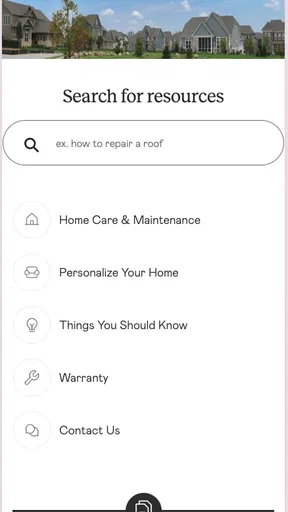
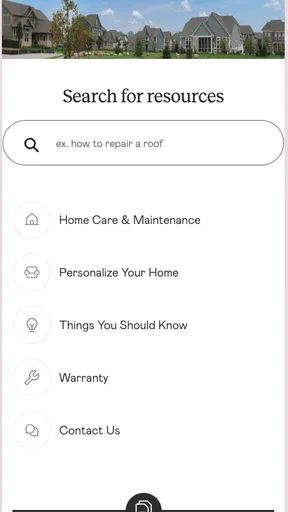
First off, Lennar Account is designed to be incredibly user-friendly. When you first open the app, you're greeted with a clean and intuitive interface. It’s like the app knows you don’t have time to mess around trying to figure out where everything is. Everything is neatly categorized, making it super easy to find what you’re looking for.
Features that Stand Out
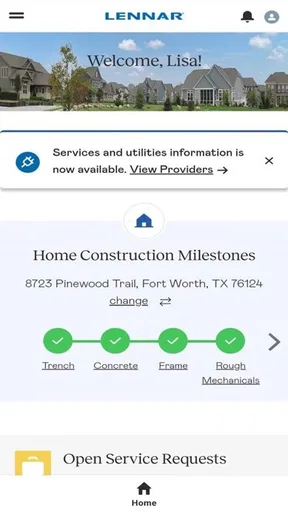
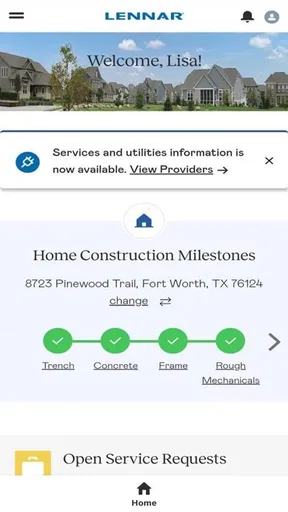
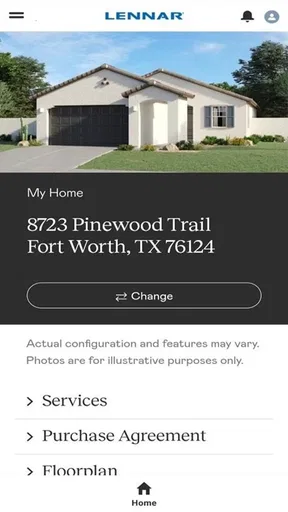
One of the standout features is the comprehensive dashboard. It’s a one-stop-shop where you can view all your home stats at a glance. Imagine all your essential home info right at your fingertips. It’s like having a mini command center on your phone. Whether it’s checking up on maintenance schedules or keeping an eye on your warranty, you can do it all from there.
The app also has a nifty feature for managing your finances related to your home. You can keep track of your expenditures, making budgeting a breeze. This is perfect for anyone who likes to keep a close eye on where their money is going. Plus, there are reminders for bills and payments, so you’ll never miss a due date again.
Community Connection
Another neat aspect is the community feature. You can connect with neighbors and stay updated on local happenings. It’s like a virtual neighborhood watch. This feature can be a great way to get involved and meet people in your area, especially if you’re new in town.
Moreover, the app provides a platform to voice any concerns or issues you might have. Whether it’s a maintenance problem or a community query, you can easily reach out and get the support you need. It’s a bit like having a direct line to customer service, but faster.
Security and Peace of Mind
Lennar Account doesn’t skimp on security features either. All your data is protected with top-notch security measures, so you can rest easy knowing your information is safe. The app also integrates with various smart home devices, allowing you to keep tabs on your home security even when you’re away. It’s peace of mind, packaged in an app.
There’s also a handy document storage feature where you can securely store and access all your important home-related documents. It’s like having a virtual filing cabinet that’s accessible anytime, anywhere. No more rifling through endless papers to find that one document you need.
Making the app useful over time
After the first submission, I’d use the app as a place to check the claim rather than repeatedly filing the same concern because I’m unsure what happened. If the status hasn’t changed when you return, that doesn’t necessarily mean you need to start over. Check the existing request first, then decide whether a separate contact is appropriate based on the urgency and what you need to clarify.
It’s also worth separating a claim from routine upkeep. A homeowner may have plenty of useful maintenance tasks that don’t belong in a claim workflow. For those, a calendar or checklist can be simpler and easier to share with anyone helping around the home. Keeping that boundary clear prevents a focused claims app from becoming a catch-all that you stop using because it’s crowded with unrelated reminders.
When I’d choose another approach
If you don’t own a Lennar home, this app is unlikely to be useful for your property. The same goes for someone whose main need is organizing bills, storing every household document, monitoring connected devices, or finding local community updates. A general home app may cover more of those jobs, while a call or other direct service contact can be preferable when you need immediate guidance rather than a trackable routine request.
Even for a Lennar homeowner, I wouldn’t rely on an app as the only record of a serious or changing issue. Keep clear notes, and use an appropriate direct contact method when the situation calls for a prompt conversation. That isn’t a flaw unique to this app; it’s a sensible boundary for any digital claim channel. The app is most valuable when it helps you submit and revisit a request without replacing your judgment about urgency.
Final Thoughts
Overall, Lennar Account is a robust app that caters to a wide range of needs for homeowners. It’s got a little bit of everything, from financial management to community engagement. It’s clear the developers put a lot of thought into making an app that is not only functional but also genuinely helpful.
If you’re a homeowner looking to simplify and enhance your home management experience, I’d definitely recommend giving Lennar Account a try. It’s like having a toolbox for your home, all neatly packaged into one app. Trust me, once you start using it, you’ll wonder how you ever managed without it.
A sensible first step
For a first-time user, I’d keep the goal modest: sign in, locate the claim path, and submit one clearly described issue when you have a genuine reason to do so. Then return to the request rather than keeping the whole process in your head. That gives you a practical way to judge whether the app suits your needs without expecting it to manage unrelated parts of homeownership.
My recommendation is therefore specific: if you’re a Lennar homeowner who wants a dedicated way to submit and follow claims, this is worth trying. If you want an all-purpose home dashboard, you may be disappointed by a tool centered on that narrower task. Used for what it is best suited to do, it can make an otherwise easy-to-forget service request easier to keep track of.
Pros
- User-friendly interface for easy navigation.
- Secure login with biometric options.
- Comprehensive account management tools.
- Real-time updates on account activity.
- 24/7 customer support available.
Cons
- Limited customization options for users.
- Occasional slow loading times.
- No offline access to account details.
- Requires frequent updates for smooth use.
- Some features locked behind paywall.
FAQs for Lennar Account
What is the purpose of the Lennar Account app?
The Lennar Account app is designed to streamline the home-buying process by providing users with easy access to their Lennar account. It allows users to track the progress of their home construction, manage appointments, and communicate directly with their Lennar team, ensuring a smooth and efficient home-buying experience.
How do I set up an account on the Lennar Account app?
To set up an account on the Lennar Account app, download the app from the Google Play Store or Apple App Store. Open the app, and follow the on-screen instructions to register using your email and a secure password. Once registered, you can personalize your account settings and preferences.
What features does the Lennar Account app offer?
The Lennar Account app offers a range of features including real-time updates on home construction, scheduling and managing appointments, accessing important documents, and direct communication with your sales and construction teams. These features are designed to keep you informed and engaged throughout the home-buying process.
Is the Lennar Account app secure to use?
Yes, the Lennar Account app prioritizes user security. It employs advanced encryption and security protocols to protect your personal information and account data. Regular updates ensure that security measures are up-to-date, providing a safe environment for managing your home-buying journey.
Can I access the Lennar Account app on multiple devices?
Yes, the Lennar Account app can be accessed on multiple devices. Whether you use an Android or iOS device, you can log into your account on smartphones and tablets, ensuring you have access to your home-buying information anytime, anywhere.


